Table of Contents
- 1. The Geo-Grid: Visualizing Your True "Service Radius"
- Why this wins clients:
- 2. Spy on the Neighbors with Competitor Analysis
- 3. Build a Technical Foundation for "Near Me" Searches
- What to check in the Audit Tool:
- 4. Scaling Multi-Location Management (Without the Headache)
- 5. Prove ROI with Integrated GMB Reporting
- What to include in the report:
- Final Thoughts: Own the Neighborhood
If you are still sending clients a single keyword ranking report for a local business, you might be telling them a lie.
Ranking #1 for "Coffee Shop" in the city center doesn't mean you rank #1 for the customer standing three miles away. Local search is hyper-specific; it’s a battle of inches, not miles. The old way of tracking—checking a single data point from a generic "city" location—is a blind spot that costs agencies clients.
To truly dominate local search, you need to see what the customer sees on their phone, block by block. Here is how you can use tools like DAXRM to turn that "blind spot" into a competitive advantage.

1. The Geo-Grid: Visualizing Your True "Service Radius"
The biggest mistake agencies make is treating a city as a single location. In reality, a business's ranking on Google Maps decays as you move away from their physical address.
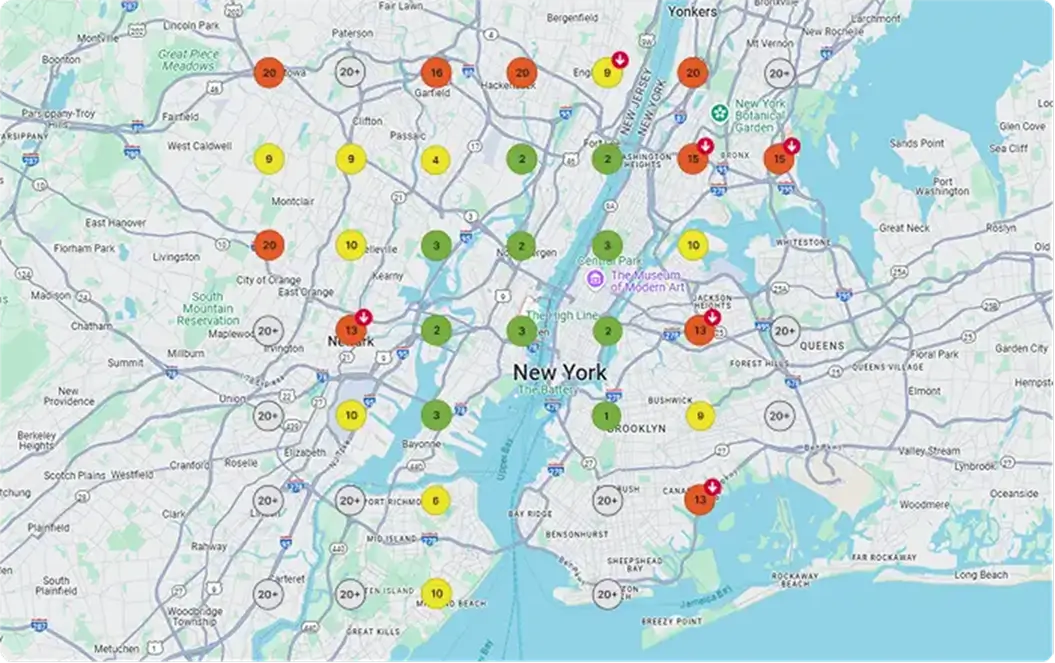
The Local Rank Tracker in your dashboard solves this by using a Geo-Grid. Instead of one ranking check, you drop a grid of pins (e.g., a 5x5 grid covering 10 miles) over the business's service area.
Why this wins clients:
- The "Heatmap" Effect: You get a visual map where green pins show where they dominate (Rank 1-3) and red pins show where they disappear.
- Actionable Targeting: If you see a sea of red pins just two miles north of the store, you know exactly where to focus your next campaign. You stop guessing and start targeting the neighborhoods where they are weak.
- Customizable Grid Shapes: Not every service area is a perfect square. DAXRM allows you to remove individual pins from your grid. This is crucial for "cleaning" your data—you can delete pins that fall on lakes, large parks, or industrial zones where no customers live. This keeps your reporting accurate and stops you from wasting credits on "dead zones."
- Pin-Level "Proof of Life": Clients are often skeptical of data. With this tool, you can click on any individual pin to open the live SERP (Search Engine Results Page) for that specific coordinate. It allows you to show the client, "Look, right here at this intersection, your competitor is #1 because they have a verified listing and you don't."
- Automated Consistency: Rankings fluctuate wildly based on the time of day and week. A one-off scan is a snapshot, not a strategy. You can schedule these grids to auto-scan weekly or monthly. This builds a historical timeline, allowing you to show a client an animation of their "Green Zone" expanding over time—the ultimate visual proof of ROI.
2. Spy on the Neighbors with Competitor Analysis
Your client doesn't care about "algorithm updates." They care about why the guy across the street is beating them.
Inside the Local Rank Tracker, you aren't just watching your own pins; you are watching the competition. The tool allows you to overlay competitor data onto your grid.
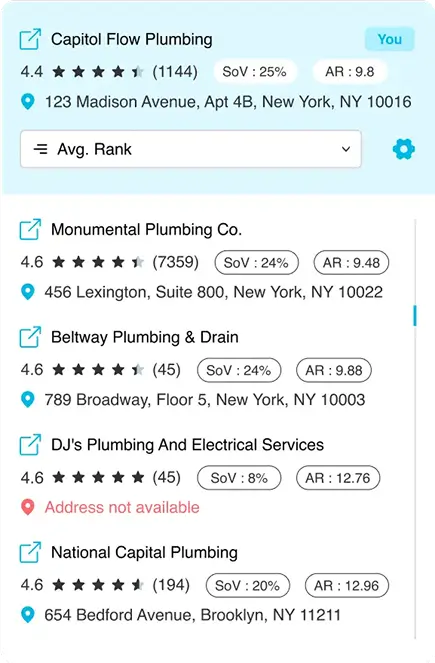
- Share of Voice (SoV): This is the ultimate "Executive Summary" metric. It calculates the percentage of the map where your client ranks in the Top 3 compared to their rivals.
- SERP Feature Intelligence: See exactly which competitors are winning the "Map Pack" vs. the organic results. If a competitor is winning on the map but losing organically, you know their GMB is strong but their website is weak—a perfect gap for you to exploit.
- Visualizing Competitor Strongholds: You can toggle the Geo-Grid view to display the map from your competitor's perspective. This instantly reveals their "territory." If they are dominating the north side of the city but have zero visibility in the south, you have a clear, data-backed justification to focus your client’s budget on the southern neighborhoods where the fight is easier to win.
- Historical Benchmarking: It’s not enough to know where they rank today; you need to know their momentum. The dashboard allows you to plot your Average Position against key competitors over time. If you see a competitor’s trend line sharply rising while yours is flat, you get an "Early Warning System" that they are aggressively spending on SEO, allowing you to react before they overtake you.
3. Build a Technical Foundation for "Near Me" Searches
You can't win local search with a broken website. While the SEO Audit Tool is often seen as a general SEO feature, it is critical for local rankings for one reason: mobile experience.
Most local searches happen on mobile devices while people are on the go. If your client's location page takes 5 seconds to load, Google will drop them from the "Local Pack" faster than you can blink.
What to check in the Audit Tool:
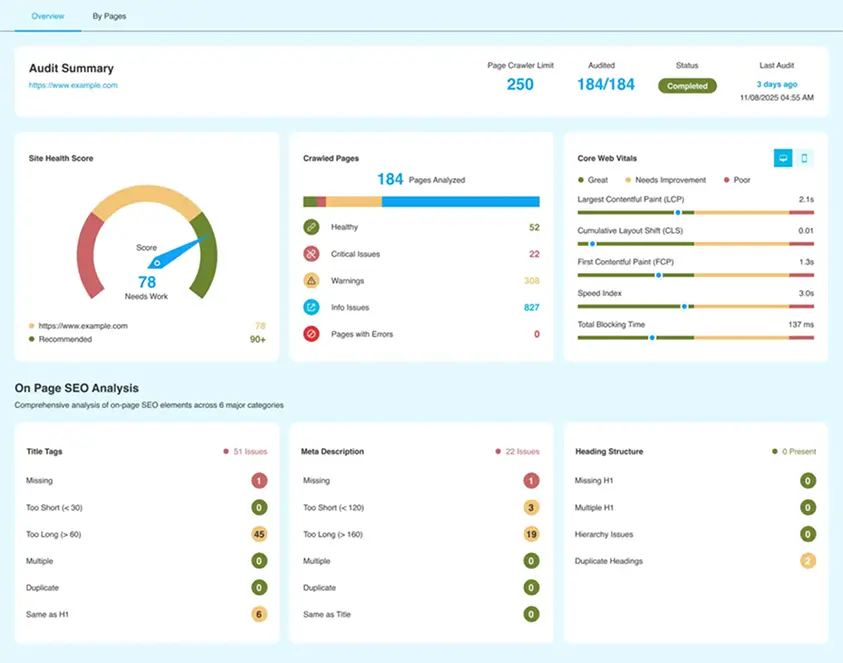
- Core Web Vitals: Use the audit to flag LCP (Largest Contentful Paint) issues specifically on location landing pages.
- Crawlability: Ensure your individual location pages aren't being accidentally orphaned or blocked. If Google can't crawl the page with the address and phone number, it can't verify the location for the map.
- Duplicate Content (The "Doorway Page" Trap): Multi-location businesses often copy-paste the same text across 50 different city pages, changing only the city name. Google hates this. The audit tool flags internal duplicate content, warning you when your location pages are too similar. This prompts you to add unique content (like local staff bios or specific project descriptions) to each page so they don't get filtered out of the index.
- Schema & Meta Tag Validation: For a search engine to trust your address, it needs to read it as code, not just text. The audit scans for missing or malformed Structured Data and Open Graph tags. Ensuring your LocalBusiness schema is present and error-free is often the technical switch that helps a page jump into the Map Pack.
4. Scaling Multi-Location Management (Without the Headache)
Managing one plumber is easy. Managing a franchise with 50 locations is a logistical nightmare if you don't have the right structure.
DAXRM allows you to manage multiple Google Business Profiles (GBP) under a single agency login, but the real power is in Grouping.
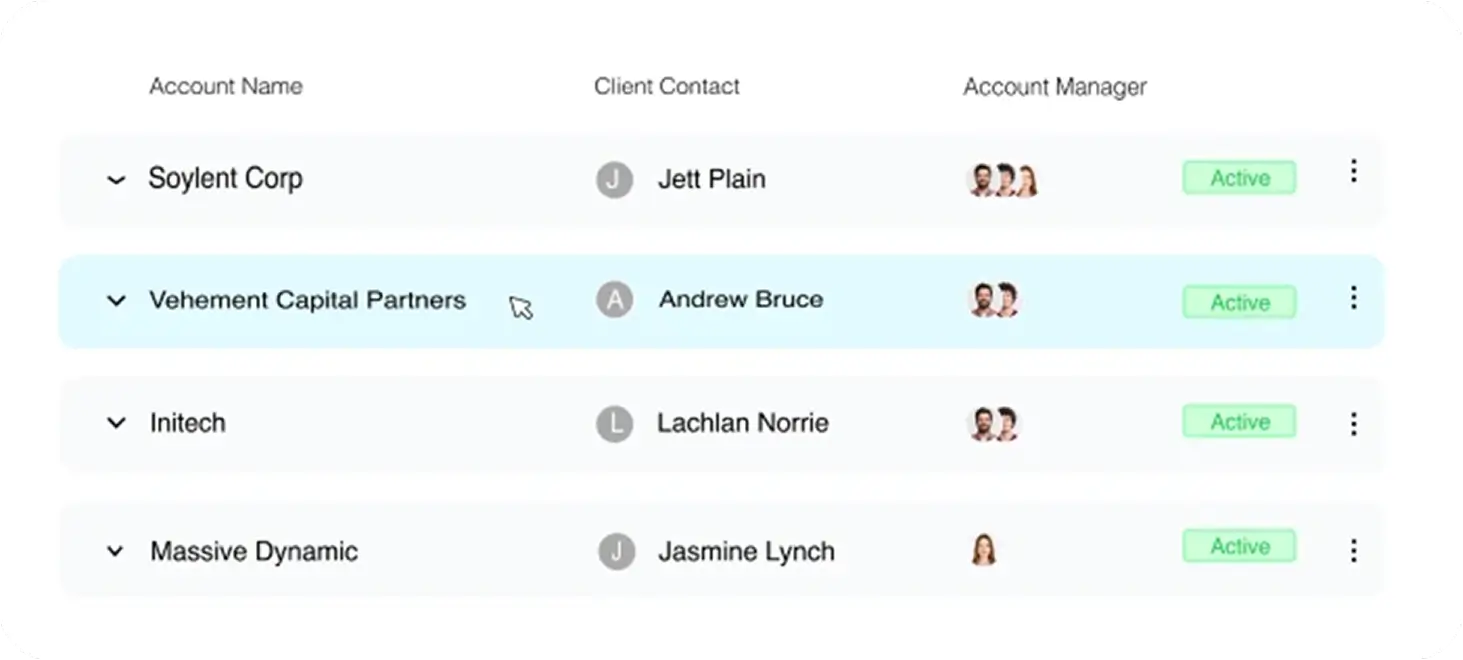
- Separate Accounts/Projects: Instead of dumping 50 locations into one messy list, create separate projects for each franchise location. This keeps the data clean.
- Template Scalability: You can build one "Local SEO Success" report template and apply it to all 50 locations. You don't need to rebuild the wheel every time a new branch opens.
- Franchisee-Level Access Control: Franchise owners are territorial; the manager in Chicago shouldn't see the New York branch's data. DAXRM’s User Permissions allow you to grant specific logins to local managers that only reveal their specific location’s dashboard. It empowers them to feel "in the loop" without exposing your entire agency structure or other clients' data.
- Regional Performance Tagging: Sometimes the CEO wants to know how the "West Coast" is doing versus the "East Coast." By using Tags on your projects or keywords, you can filter reports to show aggregate performance for specific regions. This allows you to spot macro-trends—like a regional dip in rankings due to a localized competitor—that you would miss if you were only looking at individual store reports.
5. Prove ROI with Integrated GMB Reporting
The hardest part of local SEO is proving that "rankings" equal "money." A client can't pay their rent with a "Number 1 Ranking."
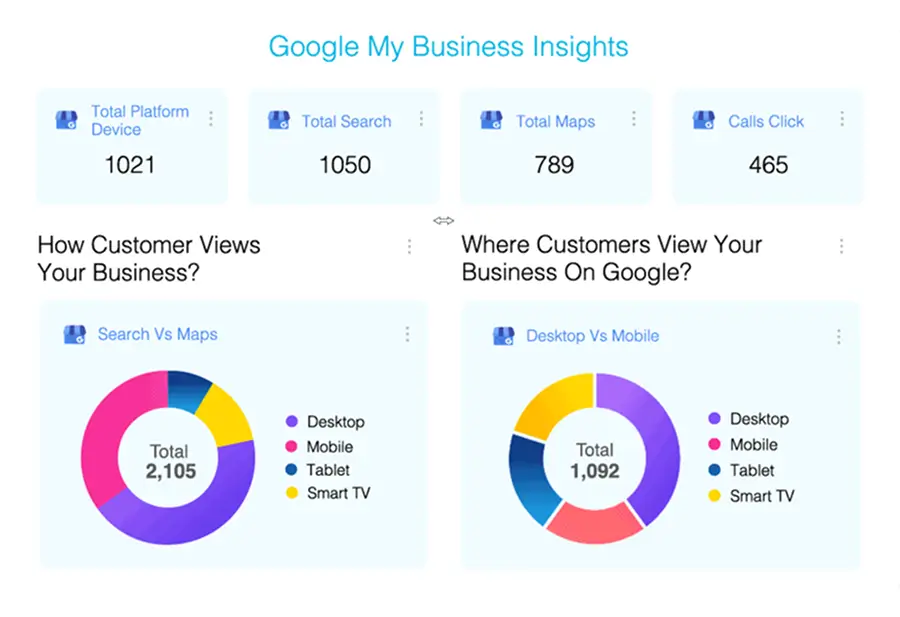
This is where Automated Reporting closes the deal. Because DAXRM integrates directly with Google Business Profile, your reports can show the metric that actually matters: Action.
What to include in the report:
- Direction Requests This is often the strongest indicator of "Foot Traffic." DAXRM tracks exactly how many users clicked "Get Directions" on your client’s map listing. Seeing a steady increase here proves that your SEO efforts are physically moving people into the store.
- Click-to-Call Actions For service businesses like plumbers or lawyers, the phone call is the conversion. Your reports highlight exactly how many calls originated directly from the Map Pack. This ties your ranking improvements directly to their lead generation pipeline.
- Review Growth Social proof is a ranking factor. The dashboard tracks the volume and sentiment of new reviews over time. Reporting on "5 new 5-star reviews" proves you aren't just managing a website; you are managing their reputation and brand trust.
- Discovery vs. Direct Searches Your client might think people are just Googling their business name. DAXRM breaks down how customers found the listing: "Direct" (searching for "Joe's Pizza") vs. "Discovery" (searching for "Pizza near me"). A spike in "Discovery" searches is proof that you are capturing strangers and turning them into customers.
- Year-over-Year Comparisons Local businesses are seasonal. A drop in calls in December might panic a client—unless you can show them the bigger picture. DAXRM’s historical data allows you to overlay this month’s performance against the same month last year, proving long-term growth despite seasonal dips.
Final Thoughts: Own the Neighborhood
Local SEO isn't about tricking the algorithm; it's about accuracy and strategy. By visualizing exactly where your clients win and lose, you stop guessing and start dominating the neighborhood. It’s the difference between sending a report and delivering a strategy.